Threads Downloader – Download Threads Videos, Photos & Media
Threads Downloader makes saving public Threads media simple and convenient. You can download supported videos, photos, images, and GIFs online. The tool works directly from your browser without a complicated workflow.
Paste a Threads post URL into the downloader above. Then start processing the link to find available media. Once processing finishes, choose the available download option and save your file.
Our goal is to provide a straightforward Threads download experience. You do not need to search through complicated menus or settings. Just use a valid Threads link and follow the simple download process.
Download Threads Content Online
You can use our Threads downloader directly from your browser. The process starts when you provide a supported Threads URL. The downloader then checks the submitted link for available media.
This approach makes threads download online simple for everyday users. You can access the tool from compatible mobile and desktop browsers. No complicated installation process is required for basic browser use.
Paste a Threads Link to Get Started
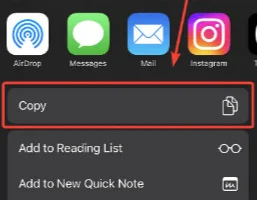
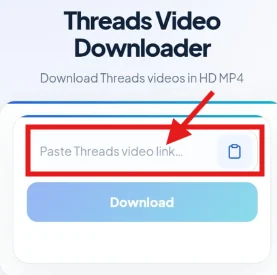
First, open Threads and find the post you want. Copy the URL from the selected public post. Return to this page and paste the link.
The download thread process begins after you submit that URL. The tool processes the link and checks available media. If supported content is found, download options can appear.
Threads Video Downloader
Videos are among the most commonly saved Threads media. Our Threads video downloader is designed for supported video posts. You can submit a Threads video URL through the downloader.
After processing, the available video download option will appear. The result depends on the media available from the submitted post. Therefore, different posts may provide different download results.
Download Threads Videos in a Few Steps
Start by opening the Threads post containing your video. Copy the post link from the Threads interface. Next, paste that link into our downloader.
Submit the URL and allow the tool to process it. When the media becomes available, select the download option. Your browser can then handle the resulting file.
This makes threads video download easier for users. You can avoid manually searching through complicated browser techniques. The entire process begins with one supported Threads URL.
Supported Threads Video Links
The downloader works with supported Threads media links. Public posts generally provide the simplest downloading experience. However, availability can depend on the post and media type.
Deleted posts may no longer provide downloadable content. Private or restricted posts can also prevent media retrieval. An invalid URL may produce an unsuccessful processing result.
Download Threads Videos Without Watermark
Many users search for threads video download without watermark options. A downloader can preserve the available media from supported Threads posts. The resulting file depends on the source media provided by Threads.
Our tool does not add unnecessary branding to the download process. However, the source media itself may contain creator-added elements. Download availability and presentation can vary between different posts.
Always respect the original creator when saving Threads content. Avoid removing creator information when doing so violates applicable rights. Use downloaded media responsibly and according to relevant permissions.
Download Threads Photos & Images
Threads posts can contain images alongside written content. Our tool can process supported image-based Threads posts. This provides an alternative to taking screenshots manually.
You can use the threads photo download process when saving supported images. Simply copy the relevant Threads post URL and submit it. If an image is available, the downloader can provide the supported result.
Download Images From Threads Posts
The threads download image process starts with the original post URL. Find the Threads post containing the image you want. Copy its link and return to the downloader.
Paste the URL into the input field and submit it. The tool checks whether supported media can be detected. Available image download options will depend on the source post.
Save the Original Available Image Instead of Taking a Screenshot
Screenshots can reduce quality and require additional editing afterward. A supported downloader can provide the available image file directly. This can make threads image downloader usage more convenient.
The actual result depends on the media supplied by Threads. Some posts may contain different image arrangements or formats. Always check the downloaded file before using it elsewhere.
Download Threads Videos, Photos & Other Media
Threads includes different types of media within user posts. A single downloader can make supported media easier to save. You can use it for videos, photos, images, and other supported content.
The download threads workflow remains similar across supported media. Copy the post URL, paste it, and start processing. Then select the available media download option.
Videos
A supported video post can be processed through the download videos from Threads workflow. The downloader checks the supplied post for accessible video media. Available quality and file options depend on the source.
Photos and Images
Images can also be processed through supported Threads URLs. The threads downloader photo workflow begins with copying the post link. The available image is then prepared for browser downloading.
Multi-Media Posts
Some Threads posts can contain multiple media items. The available result depends on how the source post exposes its content. Processing may therefore vary between individual posts.
Download Threads GIFs
GIF-style media can be useful for sharing reactions and short animations. Users searching for threads download gif options can submit supported Threads links. The downloader checks whether compatible media can be retrieved.
Not every animated post will necessarily produce the same result. The original post format can affect available download options. If processing fails, verify the URL and try again.
How to Use Threads Downloader
Using a threads downloader website should not require complicated technical knowledge. The basic process involves copying and submitting the Threads URL. Follow these four steps to get started.
1. Copy the Threads Post Link
Open the Threads application or website first. Find the public post containing your desired media. Use the available share option to copy its URL.
Make sure you copy the complete Threads post address. An incomplete link may prevent successful processing. Returning to the downloader is the next step.
2. Paste the Link Into the Downloader
Paste your copied URL into the downloader input field. Check the address before submitting it for processing. A correct link helps the tool identify the intended Threads post.
This is the main step in the thread download process. You do not need to manually locate media files. The downloader handles the URL-based processing workflow.
3. Process the Threads Link
Click the download or processing button shown by the tool. The system then checks the submitted Threads URL. Processing time can vary depending on the media and connection.
If the link is supported, available media can be detected. If nothing appears, check the URL for errors. You can also try another supported public post.
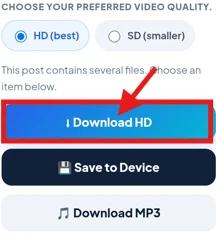
4. Download the Available Media
Once processing finishes, review the available result. Select the relevant download option for your media. Your browser will then manage the file download.
The final result depends on the original Threads content. Some posts may provide video options. Others may provide image or other supported media options.
What Can You Download From Threads?
The threads downloader supports different media types where available. The exact result depends on the submitted Threads post. Public media is generally easier to process than restricted content.
Understanding supported content helps you choose the right post. It also makes troubleshooting easier when something fails.
Threads Videos
Videos are a primary reason people search for download thread videos tools. A supported Threads video URL can be submitted through the downloader. The available file depends on the source media.
Threads Photos
Photos can be saved from supported Threads posts. The threads download photo process uses the post URL. You can then download the available image through your browser.
Threads Images
Image-based posts can also be processed when supported. A threads photo downloader can help save available media. This avoids relying on screenshots for every image.
Threads GIFs
Animated content can sometimes be available for download. Users looking for download threads gif solutions can submit supported posts. Results depend on how the original media is provided.
Supported Public Media Posts
Public posts are generally the most suitable for downloading. Private, restricted, removed, or unavailable posts may not process. The downloader cannot guarantee access to unavailable content.
Threads Downloader on Android, iPhone & Desktop
A browser-based threads video downloader app is not always necessary. You can use a compatible browser when accessing the online tool. This can simplify the experience across different devices.
Android
Android users can open the downloader through a compatible mobile browser. Copy the Threads post link from the app or website. Then paste it into the downloader and process the URL.
This provides a simple way to handle threads download requests. Your browser manages the resulting download based on device settings.
iPhone and iPad
iPhone and iPad users can also access the downloader through Safari. Copy the required Threads post URL first. Then paste it into the downloader input field.
The download Threads video iPhone process can depend on browser behavior. Your device may handle downloaded files through its Files application. Check the browser download area if necessary.
Windows
Windows users can access the downloader through a desktop browser. Copy the Threads URL and paste it into the tool. After processing, save the available media to your computer.
This makes threads download Windows usage straightforward. No dedicated desktop downloader is required for browser-based access.
Mac
Mac users can use a compatible browser in the same way. Open Threads, copy the required post URL, and return here. Submit the link and download supported media.
The process for threads video download Mac users remains simple. Your browser controls where the resulting file is saved.
Browser
A browser provides the main access point for this tool. You can use a compatible modern browser across supported devices. The interface is designed around a simple URL-based workflow.
Download Threads Videos in the Available Quality
Video quality depends on the source media and available download result. The downloader cannot create quality that does not exist. Therefore, available options may differ between Threads posts.
When possible, choose the highest suitable quality provided. Consider your device storage before downloading larger files. For sharing, also consider the original creator's rights.
Threads Downloader Features
The threadsdownloader experience focuses on simple media retrieval. The main features are designed around URL-based downloading. This keeps the workflow clear for regular users.
Simple URL-Based Downloads
The downloader uses a Threads post URL as its starting point. You do not need to manually search for media files. Simply provide a supported link.
Browser-Based Access
You can access the tool through a compatible browser. This makes it easier to switch between phones and computers. You can use the same basic workflow across devices.
Mobile-Friendly Interface
The downloader is designed for convenient browser use. Mobile users can copy links directly from Threads. They can then paste those links into the tool.
Video and Image Support
Supported Threads posts can contain different media types. The tool can process available videos and images. Other supported media may also be detected when available.
Simple Download Workflow
The basic process requires only several straightforward actions. Copy the link, paste it, process it, and download. This reduces unnecessary steps for everyday users.
Fast Media Processing
Processing time depends on several factors. These can include the source post and network connection. Temporary service conditions can also affect the final response time.
Why Use a Dedicated Threads Downloader?
A dedicated Threads downloader focuses specifically on Threads media. This can make the process easier than using unrelated tools. The interface is centered around a single downloading task.
Designed Specifically for Threads
The tool is built around Threads post URLs. This keeps the workflow focused on Threads content. Users do not need to navigate unrelated download features.
Fewer Steps
The basic process only requires a supported URL. You can then submit that URL for processing. This avoids complicated manual extraction methods.
No Complicated Setup
Browser access keeps the initial workflow simple. Users can start without configuring technical software. A compatible browser is enough for basic access.
Convenient on Mobile and Desktop
The same basic workflow can be used across devices. Android, iPhone, Windows, and Mac users can access the browser tool. Device download behavior may vary.
Focused Media Downloading
The tool focuses on saving supported Threads media. This includes available videos, photos, and images. GIF-style content may also be supported when available.
What Happens After You Submit a Threads URL?
When you submit a link, the downloader begins processing it. Several steps can occur before a download becomes available. Understanding this process can help when results differ.
URL Validation
The submitted address is checked to determine whether it is usable. Incorrect or incomplete URLs may fail at this stage. Always copy the complete Threads post link.
Media Detection
The system checks the post for supported media. Different posts can contain different media types. Therefore, available results may vary between URLs.
Processing
The media is prepared for the available download result. Processing duration can depend on the source and connection. Temporary technical issues can also affect this stage.
Available Download Options
After successful processing, available options can be presented. Choose the relevant media based on your needs. Your browser then handles the resulting download.
When a Threads Download Does Not Work
Sometimes a download threads video request may fail unexpectedly. Several common issues can cause unsuccessful processing. Checking the source URL is a good first step.
Missing or Invalid Threads URL
An incomplete URL can prevent proper media detection. Copy the post link again from Threads. Then paste the complete address into the downloader.
Deleted Threads Post
Deleted content may no longer be available. A downloader cannot retrieve media that is no longer accessible. Try another available Threads post if necessary.
Private or Restricted Content
Private content can have access restrictions. The downloader should not be used to bypass those restrictions. Only use content you are authorized to access.
Unsupported Media
Some posts may contain media that the tool cannot process. This can happen with unusual or unsupported formats. Try a different public media post.
Temporary Processing Error
Temporary service issues can affect processing. Wait briefly and submit the link again. You can also try another supported URL.
Browser or Network Problem
A weak connection can interrupt processing or downloading. Refresh the page and check your internet connection. Using another compatible browser may also help.
Can You Download Private Threads Content?
The Threads video downloader should not be treated as a method for bypassing privacy controls. Private or restricted posts may not be accessible through the tool.
Only download media you are permitted to access. If a post requires account access, respect those restrictions. Do not share passwords or private account credentials with downloader services.
Public content is generally more suitable for browser-based downloading. Availability still depends on the source post and supported media. Always respect the privacy choices of Threads users.
Downloaded File and Browser Tips
After you save Threads video files, your browser controls the download location. Different devices can use different folders or download managers. Checking your browser settings can help locate saved files.
When Your Browser Plays Instead of Downloads
Some browsers may open certain media files directly. This does not always mean processing failed. Check the browser controls for available saving options.
Where the Downloaded File Goes
Desktop browsers commonly use a default Downloads folder. Mobile devices may use a browser-specific download area. Check your device's file manager when needed.
What to Do if the File Does Not Open
First, confirm that the download completed successfully. Then check the file extension and size. Try opening the file with a compatible media application.
Check the File Format
The resulting format depends on the available source media. Your device should support the downloaded format. If necessary, use an appropriate compatible media player.
Try Another Compatible Browser
Browser behavior can differ between devices and versions. If downloading fails repeatedly, try another modern browser. This can help identify browser-specific problems.
Is Threads Downloader Safe?
Using a Threads downloader website responsibly starts with protecting your information. Never provide your Threads password to a downloader tool. A normal media downloader should work from a post URL.
Use caution when downloading unfamiliar files from any website. Keep your browser and security software updated. Avoid opening files that appear suspicious or unexpected.
Do Not Share Your Threads Password
A downloader does not normally need your Threads password. Never enter private login credentials into an unfamiliar downloader. Your account information should remain protected.
Use the Correct Threads URL
Only submit the URL required for media processing. Avoid sharing personal information alongside the link. A public post URL is generally enough for supported content.
Check Downloaded Files
Review files after downloading them. Confirm the file type and expected media content. Delete anything that appears suspicious or unrelated.
Protect Your Personal Information
Do not provide unnecessary personal details to downloader services. Be especially careful with passwords and account credentials. Responsible downloading includes protecting your digital privacy.
Is Downloading Threads Content Legal?
The legality of downloading Threads content depends on several factors. Copyright, permissions, local laws, and intended use can all matter. Downloading does not automatically give you ownership of content.
You should only reuse media when you have appropriate permission. Personal saving can still involve copyright or platform considerations. Always respect creators and applicable laws.
Do not use downloaded content to impersonate creators. Avoid commercial reuse without the required rights. When uncertain, seek permission before publishing or redistributing media.
Threads Downloader vs Other Download Methods
Several methods can help users save online media. Manual screenshots work for images but can reduce quality. Screen recording can work for videos but requires extra steps.
Browser-based downloaders offer a more focused workflow. You simply provide the Threads URL and process it. This can be more convenient when supported media is available.
The best method depends on your specific needs. For supported public posts, a dedicated downloader can reduce unnecessary steps. Always choose methods that respect privacy and content rights.
Frequently Asked Questions About Threads Downloader
What Is Threads Downloader?
Threads Downloader is a browser-based tool for supported Threads media. It can process compatible post URLs and provide available downloads. Supported media may include videos, photos, images, and GIFs.
How Do I Download a Threads Video?
Copy the URL of the Threads video post. Paste it into the downloader input field. Submit the link and download the available result.
How Do I Download Threads Photos?
Copy the Threads post containing the desired photo. Paste the URL into the downloader. If supported, the available image can then be downloaded.
Can I Download Threads GIFs?
Supported animated media may be downloadable from Threads posts. Submit the relevant post URL to check availability. Results depend on the original media format.
Is Threads Downloader Free?
The basic browser workflow is designed around straightforward URL processing. Any applicable usage limits or service conditions should be checked on the tool itself.
Do I Need to Install an App?
You can access a browser-based Threads downloader through a compatible browser. This means a dedicated downloader application is not necessarily required.
Can I Use Threads Downloader on Android?
Yes, you can access the tool through a compatible Android browser. Copy the Threads URL and paste it into the downloader.
Can I Use It on iPhone?
Yes, iPhone users can access the downloader through a compatible browser. Safari can be used to copy, submit, and manage supported downloads.
Can I Use Threads Downloader on Windows or Mac?
Yes, the browser-based tool can be accessed from compatible desktop browsers. Windows and Mac users can follow the same basic workflow.
Can I Download Threads Videos Without a Watermark?
The available result depends on the source media. The downloader does not need to add unnecessary branding to the process. Creator-added elements may remain part of the original media.
What Video Quality Can I Download?
Available quality depends on the source media and processing result. The downloader cannot provide quality that is unavailable from the source.
Can I Download Content From Private Threads Accounts?
Private or restricted content may not be accessible through the downloader. Do not use downloading tools to bypass privacy restrictions. Only download content you are authorized to access.
Why Is My Threads Link Not Working?
Check that the copied URL is complete and correct. The post may also be deleted, private, restricted, or unsupported. Trying another public Threads post can help identify the issue.
How Long Does a Threads Download Take?
Processing time can vary depending on the media and connection. Temporary service conditions can also affect the result. Most importantly, keep the submitted URL valid and complete.
What Should I Do if the Downloaded File Will Not Open?
Check whether the file downloaded completely. Then verify its extension and compatible application. You can also try downloading the media again.
Is It Legal to Download Threads Content?
Downloading content can involve copyright and privacy considerations. Your intended use and local laws may affect what is permitted. Always respect creator rights and applicable rules.
Start Your Threads Download
Ready to download from Threads? Start by finding the public post you want. Copy its Threads URL and return to this page.
Paste the link into the downloader above. Submit it and wait for available media options. Then choose the supported file you want to save.
Whether you need a video, photo, image, or GIF, the workflow remains simple. Use a valid Threads URL and let the downloader handle the processing.
Paste your Threads link above and start downloading supported media today.